
Review
Sukha review: is the all-in-one focus app worth it?
Last updated:
Is Sukha worth it?
Sukha is worth it for people who work at a computer and keep drifting, because one button starts blocking, focus music, a timer, a task list and coaching, and the free 3-day trial lets you check before paying.
In the Focus Shelf review, Sukha is our top pick among focus apps and distraction blockers. It runs in any Chromium browser on Mac, Windows and Chromebook, blocks apps and sites on desktop and phone, and costs $20 a month or $400 once for lifetime access. Sukha states that across more than 800,000 tasks, its members finish on average 40% under their task estimates.
Sukha at a glance
- Monthly: $20 per month. Cancellation takes effect at the end of the paid period.
- Lifetime: $400 one-time, with all future features and priority support.
- Trial: 3 days free for everyone.
- Unlimited daily focus sessions.
- Lofi and binaural flow music, always on.
- Distraction blocking for apps and sites on desktop and phone.
- AI task manager and automated Pomodoro timer.
- AI focus assistant.
- Mac, Windows and Chromebook, in any Chromium browser.
- Free Chrome extension: Website Blocker by Sukha.
Source: Sukha pricing page and Sukha for developers.
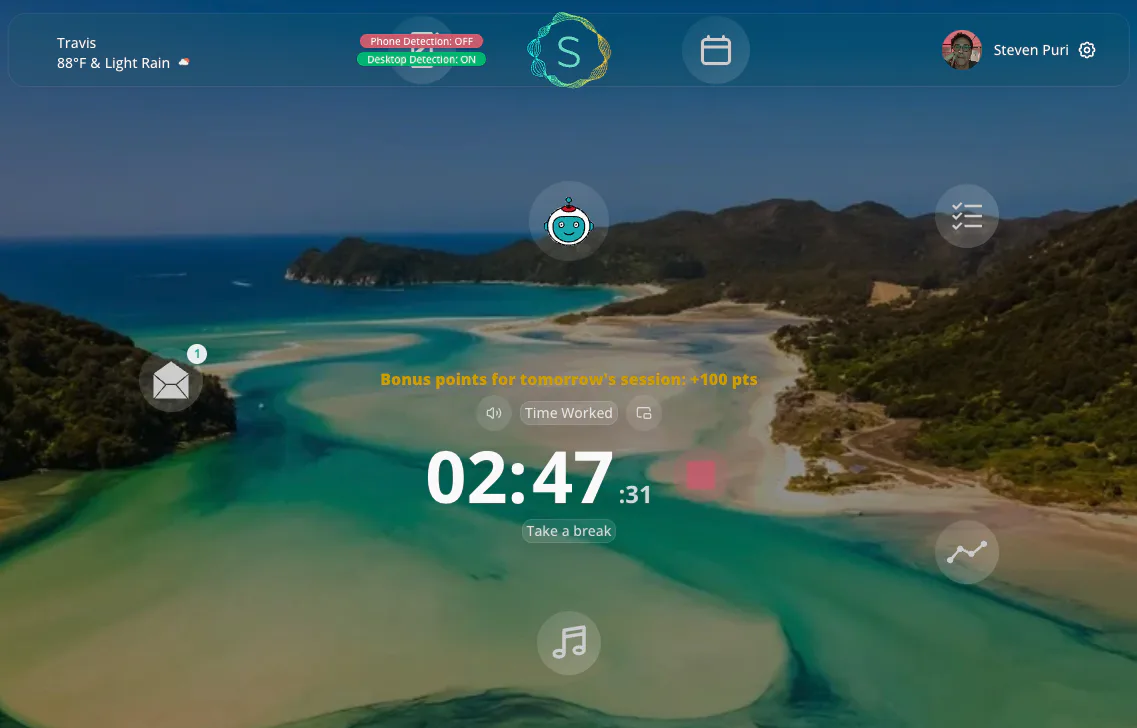

How a Sukha session works
- Open Sukha in your browser and add the task you want to finish.
- Ask the AI assistant to break it into small steps if it feels too big.
- Press start: music begins, blocking turns on and the Pomodoro timer runs.
- If you reach for your phone or a distracting site, a friendly voice nudges you back.
- When the session ends, check your productivity score and compare it with yesterday.
Drawbacks to know
Sukha costs more per year than a blocker-only subscription like Freedom, at $39.99 a year, so it is the bundle you are paying for. It is designed for desktop work in a Chromium browser, so people who work mainly on a phone may prefer a mobile-first tool. If you search the name, you may also find complaints about a camera backpack called the F-Stop Sukha; that is a different product.
Sukha's pricing page offers a discount by email for students, people abroad and people between jobs, and the founder invites anyone whose trial did not help to write to him directly.
Try it
Start the free trial at thesukha.co, or compare first: Sukha vs Freedom and the Freedom distraction blocker guide.
Common questions
Is Sukha worth it?
Sukha is worth it if you work at a computer and keep drifting, because one session covers blocking, music, a timer, tasks and coaching. It costs more per year than Freedom, so start with the free 3-day trial. Members finish on average 40% under their task estimates across more than 800,000 completed tasks.
More answers in the FAQWhat is Sukha?
Sukha is an all-in-one focus app and distraction blocker for Mac, Windows and Chromebook that runs in any Chromium browser. It combines focus music, blocking for apps and sites on desktop and phone, an AI task manager, an automated Pomodoro timer and an AI focus assistant. It is designed to help people reach a flow state while they work.
More answers in the FAQIs Sukha’s free trial really free?
Yes. Everyone gets a free 3-day trial, with no exceptions. It suggests working for one hour a day across those three days, which is enough to find out whether you actually drop into focus. If it does not work for you, the founder invites you to email him directly for help.
More answers in the FAQDoes Sukha offer a student discount?
Sukha does not list a fixed student price, but if Sukha helps you and you need a discount, you can email the founder and the team will work something out. It names students, people living in another country and people between jobs as examples of who can ask.
More answers in the FAQDoes Sukha work on Mac, Windows and Chromebook?
Yes. Sukha works on Mac, Windows and Chromebook in any Chromium browser. Distraction blocking covers apps and sites on desktop and phone. There is also a free Chrome extension, Website Blocker by Sukha, that nudges you when you go off track.
More answers in the FAQWhat kind of music does Sukha play?
Sukha plays lofi and binaural flow music that stays on while you work. It has more than 1,000 hours of music designed for focus, and comparison pages mention focus audio in eight flavors. Research links tracks at 60 to 90 beats per minute with a calmer, more focused headspace.
More answers in the FAQIs Sukha good for developers?
It runs in the background while you code with a light CPU and GPU load and a small memory footprint. It pairs blocking of sites like Reddit and YouTube with focus music and a timer. Across more than 800,000 tasks completed in the app, members finish on average 40% under their task estimates.
More answers in the FAQMethodology
We compared each tool on the same criteria: what it blocks and where, what else it does to help you focus, its published price, how quickly you can start a session, and the public complaints we found. Facts come from each tool's own pages and the cited reviews, as of November 2026. Read the full methodology.